Word Search on the screen
How to download and install Word Search
Use the button on this page to download the Word Search game. The file is an Android package, 34MB, version 1.1.6.
Download Word Search
Tap the button on this page. It opens the address where the APK is.
Save the Word Search APK
Wait until the phone has finished saving the APK, then open that file.
Allow the Word Search install
If the phone asks about an unknown source, allow this install once, following the system prompt.
Open the Word Search app
When the install finishes, open the app from the home screen, then register an account as the next section says.
How to register for Word Search
Open registration for Word Search
After you open the app, tap Register. Do not submit the form twice.
Enter your mobile number for Word Search
Use your own mobile number to receive the code, then set a login password.
Check the account, then open Word Search
Check that the account is open, then choose the game you want to play.
How to log in to Word Search
Log in to Word Search with your mobile number
If you already have an account, tap Log in. Enter the mobile number and password you used when you registered.
If you forget the Word Search password
Tap Forgot password. Use the same mobile number to receive a code, then set a new password. Do not submit it twice.
Word Search details
| Game | Word Search |
|---|---|
| Category | Puzzles |
| Version | 1.1.6 |
| APK size | 34MB |
| System | Android |
| Language | English and Hindi. You switch them inside the app. |
| Age | 18+ |
| Price | Word Search is free to download |
What Word Search is like
- A round is one grid of letters, one letter to a cell, with the words to find this round beside it.
- A word hides on a continuous straight line. It can run across, down, or on a diagonal. You cannot skip a cell in the middle.
- A word counts as found only when the letters you mark are, in order, exactly that word on the list.
- A word you find is taken off the ones still to find. When the list is clear, the round ends. The timing, and how many points each word is, are shown on the table you join.
Why play Word Search
For players who like seeing a word in the letters, Word Search may be a good fit. Your eyes follow a row or a column, and when it matches you mark it.
Which line you mark this time is your own tap. If the word is still on the list, you can keep looking.
How to play Word Search
-
Look at the grid and the word list first
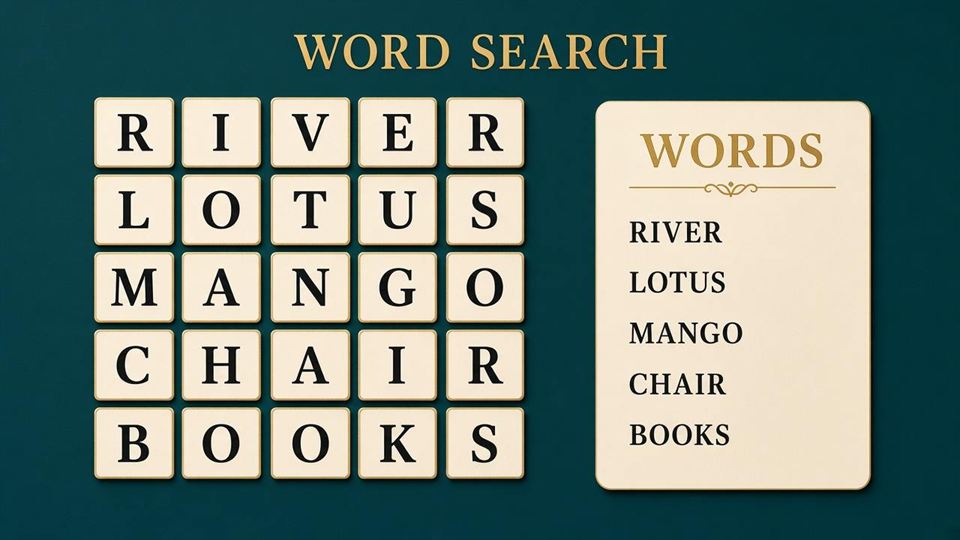
When you enter, look at this grid and the word list on the right. This picture is five rows by five columns: RIVER, LOTUS, MANGO, CHAIR, and BOOKS. The list has those same five words. How big the grid is, and how many words there are, is shown on the table you join.
The grid and the word list -
Pick a word
Pick a word from the list that has not been found yet. Pick RIVER first.
-
Mark a straight line
Mark R, I, V, E, R across the first row from left to right. That row lights up, and no cell is skipped in the middle.
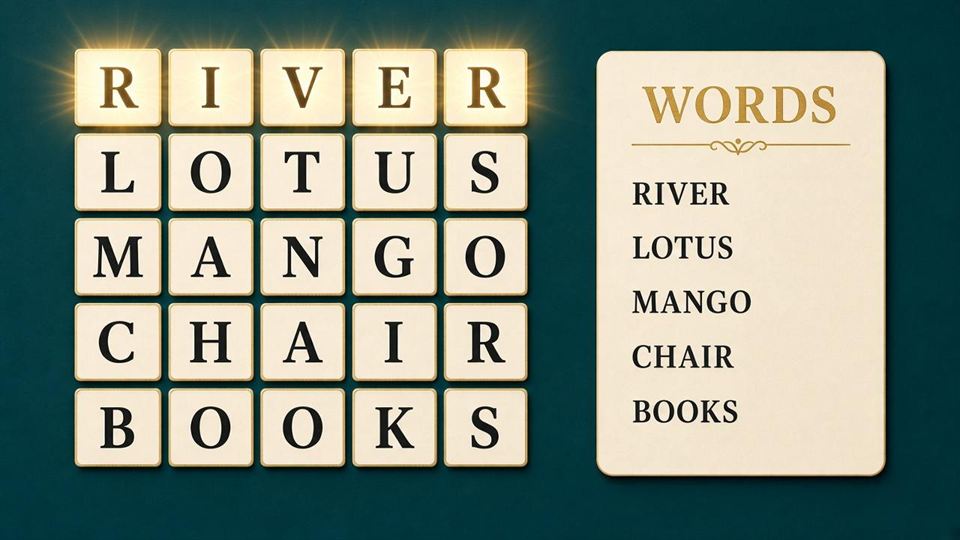
RIVER is marked -
Take it off the word list
This row matches, so take RIVER off the ones still to find. Mark each remaining word along a straight line.
-
The word list is clear
When every word on the list has been found, this round ends. Whether there is a timer is shown on the table you join.
Playing Word Search well
What to do
- Match RIVER on the list first, and mark the whole first row from left to right. What lights up is R, I, V, E, R.
Mark a whole row first - The second row across is LOTUS. L, O, T, U, and S sit together. Mark them along that row.
- Finish marking one word before you pick the next. If the word is still on the list, that line has not matched yet.
What not to do
- Marking with a skip in the middle. What is crossed out is the separated R, M, and B in the first column. L, O, T, U, and S across the row are still in the grid, with no cross.
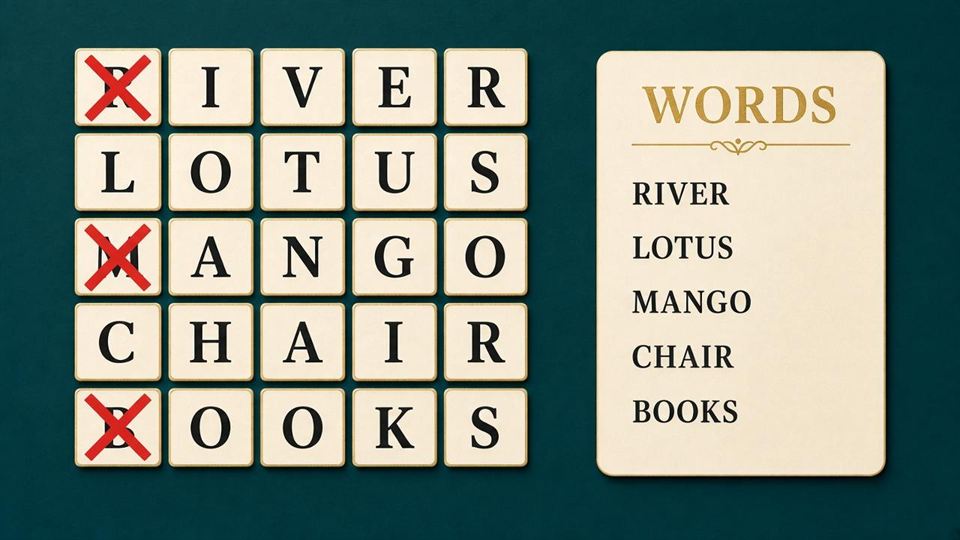
The first column was marked with skips - Handing in a string that is not on the word list. The letters have to be, in order, exactly that word on the list.
- Treating the round as over while a word is still on the list. The round ends only when every word on the list has been found.
- Joining letters that do not touch into a word. Mark only one continuous straight line at a time.
Rules of Word Search
- The grid and the word list
-
- A round is one grid of letters, one letter to a cell.
- Beside it is the list of words to find this round.
- How big the grid is, and how many words there are, is shown on the table you join.
- How a word is hidden
-
- A word sits on one continuous straight line.
- It can run across, down, or on a diagonal.
- You cannot skip a cell in the middle.
- Whether you can read it backwards is shown on the table you join.
- What counts as found
-
- Mark one straight line at a time.
- The letters you mark have to be, in order, exactly that word on the list.
- If it matches, that word is taken off the ones still to find.
- A string that is not on the word list does not count.
- This round ends
-
- When every word on the list has been found, this round ends.
- Whether there is a timer, and how many points each word is, are shown on the table you join.