Jackpot Link on the screen

How to download and install Jackpot Link
Use the button on this page to download Jackpot Link. The install file is an Android APK of 34MB, version 1.1.6.
Download Jackpot Link
Tap the button on this page. It opens the address where the APK is.
Save the Jackpot Link APK
Wait until the phone has finished saving the APK, then open that file.
Allow the Jackpot Link install
If the phone asks about an unknown source, allow this install once, following the system prompt.
Open the Jackpot Link app
When the install finishes, open the app from the home screen, then register an account as the next section says.
How to register for Jackpot Link
Open registration for Jackpot Link
After you open the app, tap Register. Do not submit the form twice.
Enter your mobile number for Jackpot Link
Use your own mobile number to receive the code, then set a login password.
Check the account, then open Jackpot Link
Check that the account is open, then choose the game you want to play.
How to log in to Jackpot Link
Log in to Jackpot Link with your mobile number
If you already have an account, tap Log in. Enter the mobile number and password you used when you registered.
If you forget the Jackpot Link password
Tap Forgot password. Use the same mobile number to receive a code, then set a new password. Do not submit it twice.
Jackpot Link details
| Game | Jackpot Link |
|---|---|
| Category | Casual |
| Version | 1.1.6 |
| APK size | 34MB |
| System | Android |
| Language | English and Hindi. You switch them inside the app. |
| Age | 18+ |
| Price | Jackpot Link is free to download |
What Jackpot Link is like
- It is a purple-and-gold wheel, the hub reads Jackpot LINK, and a pointer is fixed at the top.
- The cells are 2X, 3X, 4X, and 5X. The same step can appear in more than one cell, such as 4X.
- Only the step under the pointer at the top counts, and only after you have tapped SPIN and the wheel has stopped.
- Jackpot LINK in the hub is not a step. The words in the title are not in the cells either.
- Each spin is settled on its own. The step this spin stops on does not mean the next spin will stop there.
- Change the stake with minus and plus before you tap SPIN. The stake is on this machine. After you tap, this spin is already set.
Why play Jackpot Link
For players who like watching the pointer and waiting for a step to stop, Jackpot Link. 2X, 3X, 4X, and 5X are separate, and you can tell them apart at a glance may be a good fit.
Look at minus and plus before you tap. When it stops, read only the step under the pointer, and this spin is clear.
How to play Jackpot Link
-
Look at the wheel and the pointer first
When you open this machine, look at the purple-and-gold wheel, the pointer at the top, and the line of words in the hub. Do not tap SPIN yet.
-
Learn the steps
The cells are 2X, 3X, 4X, and 5X. The same step can appear in more than one cell. Jackpot LINK in the hub is not in those cells.

Learn these steps first. -
Set this spin
Change this spin's stake with minus and plus. The stake is on this machine. This page does not state it. Set it, then tap SPIN.
-
Tap SPIN
Once the stake is set, tap the purple SPIN. Only then does this spin start. Before you tap, the step in front of you is not a result.
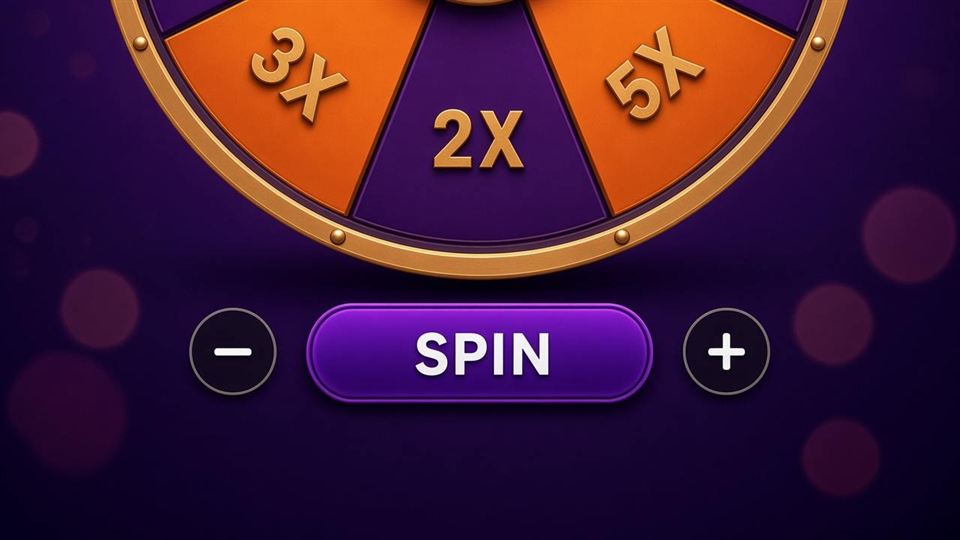
Tap SPIN -
Read the step under the pointer
When the wheel stops, look only at the step the pointer at the top rests on. A 4X beside it does not count, even if it also reads 4X. How it is settled is on this machine.

Read only the step under the pointer. -
This spin ends
This spin ends when the wheel has stopped and the stake is settled from the step under the pointer. To spin again, set the stake again and tap SPIN.
Playing Jackpot Link well
What to do
- Learn all four steps first. The cells show only 2X, 3X, 4X, and 5X. The line in the hub is separate.
Learn these four steps first. - Read it only after it has stopped. Read only the step under the pointer at the top. Do not read another cell that also says 4X.
Read only this step. - Set the stake first, then tap SPIN. Minus and plus sit on either side of the purple button.
Set the stake first.
What not to do
- Treating the words in the hub as a step. Jackpot LINK is written in the hub, not under the pointer.

The hub does not count. - Counting a cell beside the pointer. If the pointer is not on it, this spin does not count it. A 4X beside the pointer is not the step under the pointer.
The one beside it does not count. - Treating the step in front of you as a result before you have tapped SPIN. The wheel has not turned, so this spin has not started.
- Changing the stake after you have tapped SPIN. This spin is already set.
- Counting the words in the title as part of the wheel. The Jackpot Link line is at the top of the screen. It is not in a cell.
Rules of Jackpot Link
- The wheel
-
- It is a purple-and-gold wheel, with a pointer fixed at the top.
- The hub reads Jackpot LINK.
- The words in the title are at the top of the screen.
- The steps
-
- The cells are 2X, 3X, 4X, and 5X.
- The same step can appear in more than one cell.
- The words in the hub are not a step.
- What counts
-
- The wheel turns only after you tap the purple SPIN.
- After the wheel has stopped, the step under the pointer at the top is this spin.
- How it is settled is on this machine. This page does not state an amount.
- What does not count
-
- If you have not tapped SPIN, the step in front of you is not a result.
- A cell the pointer is not resting on does not count. A neighbouring cell with the same step does not count either.
- Jackpot LINK in the hub does not count.
- The words in the title do not count.
- Stake
-
- Change it with minus and plus before you tap SPIN.
- After you tap, the stake for this spin is already set.
- The stake is on this machine. This page does not state it.
- Each spin stands alone
-
- Look at each spin on its own.
- The step this spin stops on does not mean the next spin will stop there.
- The cells from the last spin do not stay for the next spin.
- The end
-
- This spin ends when the wheel has stopped.
- It is settled from the step the pointer rests on.
- To spin again, set the stake again and tap SPIN.