Cricket Challenge on the screen
How to download and install Cricket Challenge
Download Cricket Challenge from the button on this page. The file is an Android APK, 34MB, version 1.1.6.
Download Cricket Challenge
Tap the button on this page. It opens the address where the APK is.
Save the Cricket Challenge APK
Wait until the phone has finished saving the APK, then open that file.
Allow the Cricket Challenge install
If the phone asks about an unknown source, allow this install once, following the system prompt.
Open the Cricket Challenge app
When the install finishes, open the app from the home screen, then register an account as the next section says.
How to register for Cricket Challenge
Open registration for Cricket Challenge
After you open the app, tap Register. Do not submit the form twice.
Enter your mobile number for Cricket Challenge
Use your own mobile number to receive the code, then set a login password.
Check the account, then open Cricket Challenge
Check that the account is open, then choose the game you want to play.
How to log in to Cricket Challenge
Log in to Cricket Challenge with your mobile number
If you already have an account, tap Log in. Enter the mobile number and password you used when you registered.
If you forget the Cricket Challenge password
Tap Forgot password. Use the same mobile number to receive a code, then set a new password. Do not submit it twice.
Cricket Challenge details
| Game | Cricket Challenge |
|---|---|
| Category | Casual |
| Version | 1.1.6 |
| APK size | 34MB |
| System | Android |
| Language | English and Hindi. You switch them inside the app. |
| Age | 18+ |
| Price | Cricket Challenge is free to download |
What Cricket Challenge is like
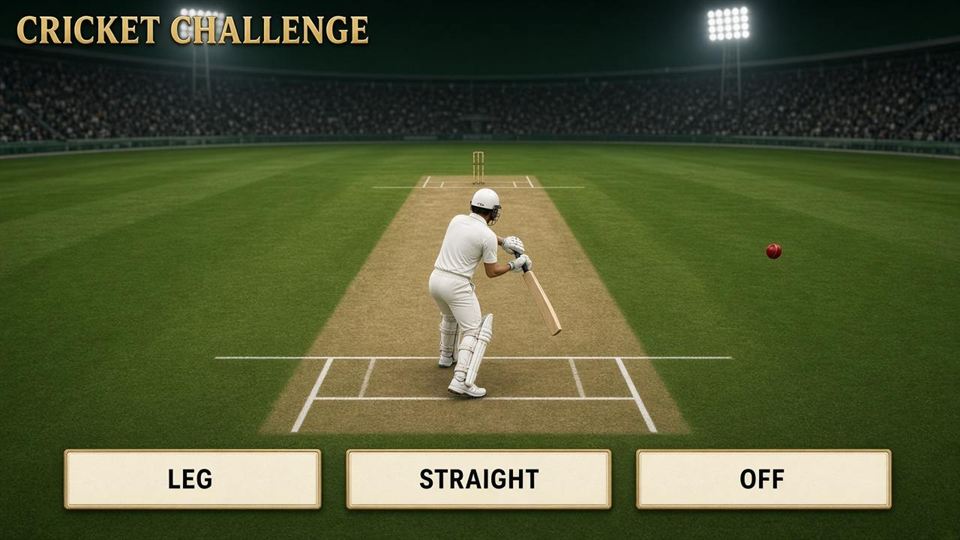
- The screen shows a cricket pitch, a batter, and a red ball flying in, with three directions below: leg side, straight, and off side.
- Tap the side the ball comes from. If you tap the right side, this ball is played.
- If the direction you tap is not the side the ball came from, this ball is not played, and it stops on the direction you tapped.
- Once the ball has passed the bat, you cannot tap any of the three directions. When the stumps are down, this ball ends.
- The next ball is a new ball. Whether you played the last one does not change which side the next ball comes from.
- This page does not state how many runs a ball scores, and it does not state how many balls are in the round. Those figures are on the screen for this ball.
Why play Cricket Challenge
Cricket Challenge may appeal to players who like seeing which side the ball comes from, then tapping that same side. While the ball is still in the air, which side you tap is this stroke.
If you tap the right side, this ball is played. If you tap the wrong side, or the ball has already passed the bat, this ball stops, and you read the next ball again.
How to play Cricket Challenge
-
See which side the ball is on first
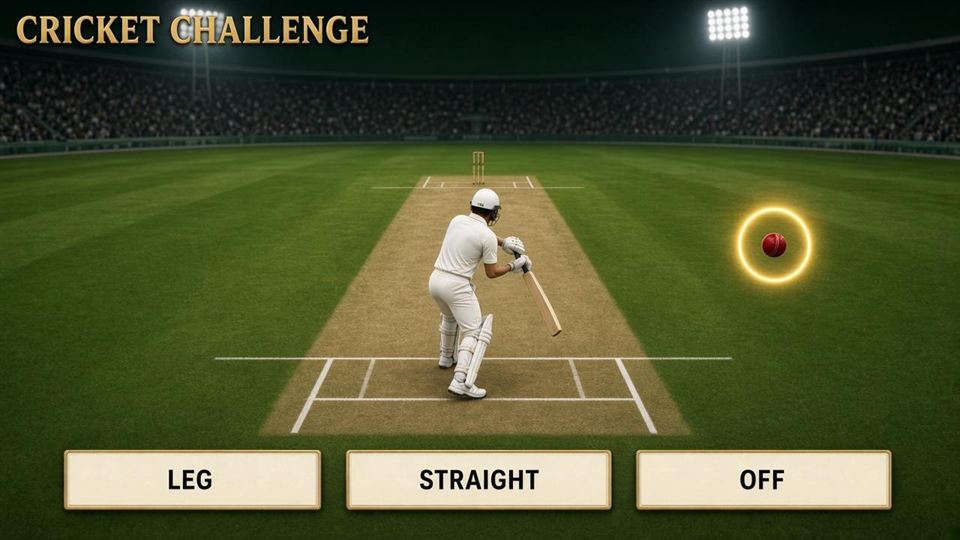
When you enter, look at three things: which side the red ball is on, the batter, and the three directions below. Where they sit is what this ball's screen shows. On this ball the red ball is on the off side.
The ball is on the off side -
Tap the off side
This ball comes from the off side, so tap the off side. The key that lights up on the screen is the one that says OFF.
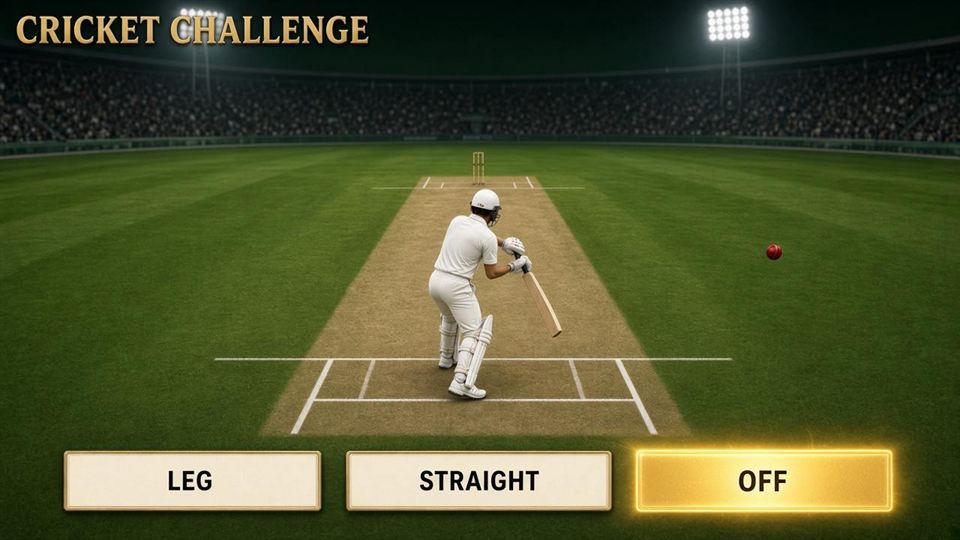
Tap OFF -
It stops once it has passed the bat
The ball has passed the bat, the stumps at the near end are down, and this ball stops. You cannot tap LEG, STRAIGHT or OFF again.
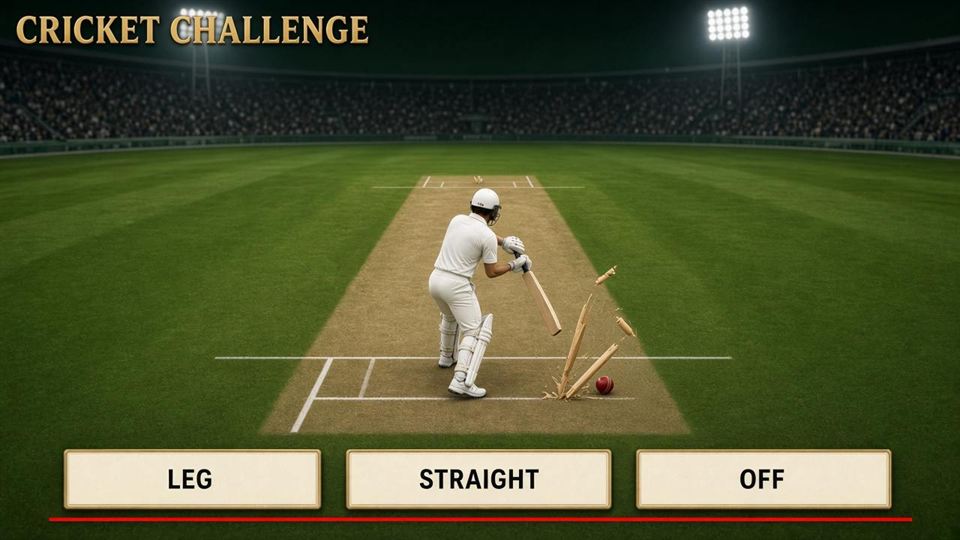
Past the bat
Playing Cricket Challenge well
What to do
- See which side the ball is on, then tap that same side. This ball is on the off side, so tap the key that says OFF.
Tap the same side - While the ball is still flying, read it before you tap. Once you have read it, tap only that one of the three directions.
What not to do
- Tapping the leg side while the ball is still on the off side. The cross is on the key that says LEG. The red ball is still on the off side, and the key that says OFF has no cross.
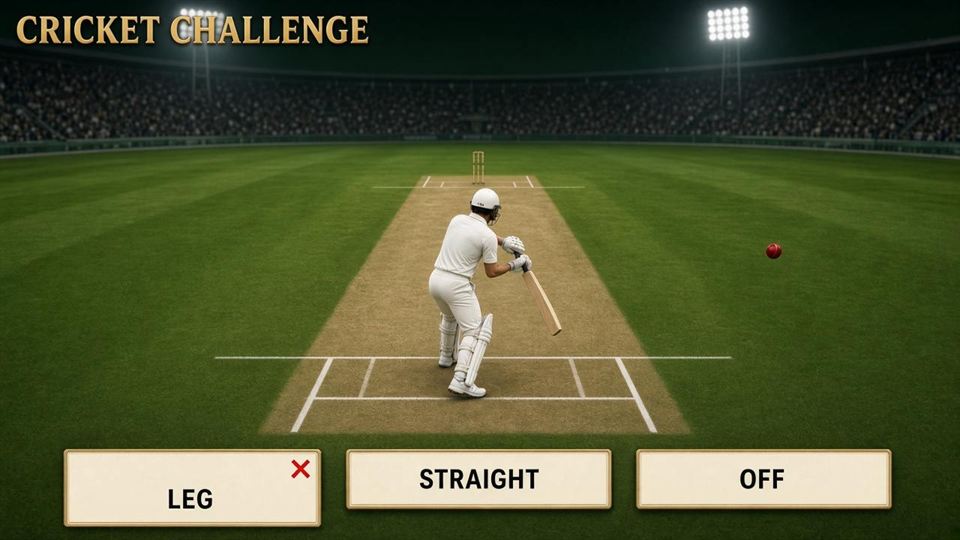
You tapped the leg side - Changing to another direction after you have tapped. The moment you tap, this ball has already stopped on that direction.
- Tapping again after the ball has passed the bat. The stumps at the near end are down, and all three directions are closed.
Already past the bat
Rules of Cricket Challenge
- How this ball is laid out
-
- The screen shows a cricket pitch, a batter, and a red ball flying in.
- Below are three directions: leg side, straight, and off side.
- The ball comes from one of these three directions.
- The tap
-
- You can tap only before the ball has passed the bat.
- The moment you tap, this ball stops on the direction you tapped.
- If it is the same side the ball came from, this ball is played.
- If you tap the other side, this ball is not played.
- After you tap, you cannot change to another direction.
- Past the bat
-
- Once the ball has passed the bat, you cannot tap any of the three directions.
- When the stumps are down, this ball ends.
- The next ball
-
- You go to the next ball only when this ball has ended.
- You have to look again to see which side the next ball comes from.
- Whether you played the last ball does not change which side the next ball comes from.
- The figures on the screen
-
- This page does not state how many runs a ball scores.
- This page does not state how many balls are in the round.
- Both figures are on the screen for this ball.
Games related to Cricket Challenge
 Slots35.74 lakh downloads₹64 when you register
 Rummy49.15 lakh downloads₹159 when you register
 Teen Patti26.50 lakh downloads₹85 when you register
 Colour Prediction38.93 lakh downloads₹125 when you register
 Aviator29.68 lakh downloads₹74 when you register
 Ludo28.53 lakh downloads₹89 when you register